
An overlay camera app that shows your last photo while you shoot
SameShot is an overlay camera app for Android. It shows your previous photo as a faint ghost over the live camera, with its opacity on a slider from 0 to 100%, so you can match the angle and distance before you shoot. The ghost never appears in the saved photo, and the app is free on Google Play.
Free for Android 8.0 and newer. The iPhone version is in development.
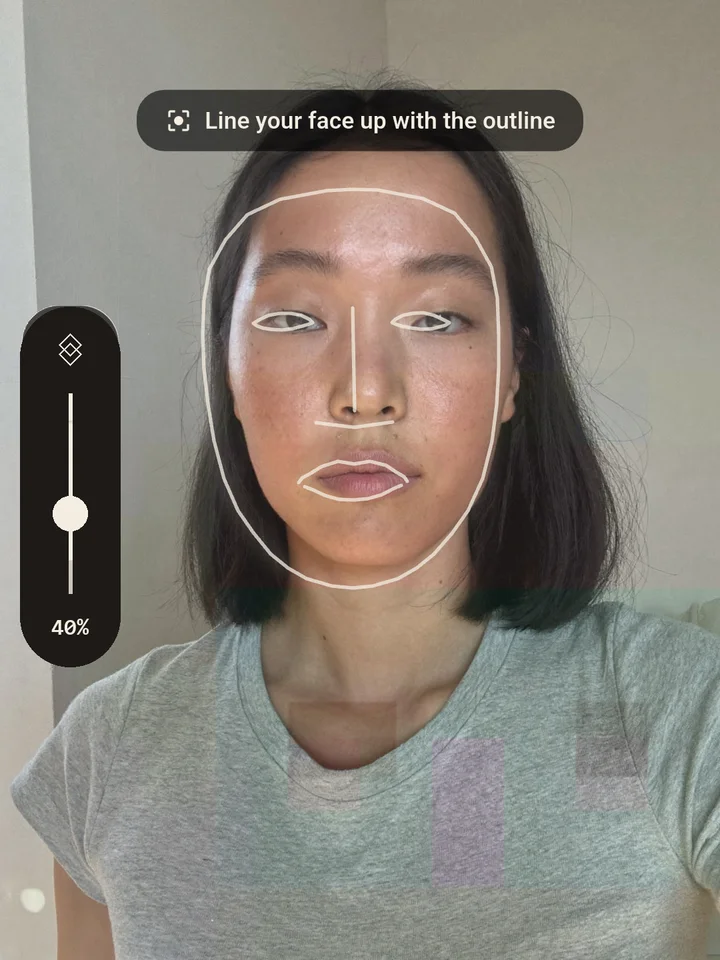
What an overlay camera app does
An overlay camera lays an earlier photo, made partly transparent, over what the lens sees now. You move the phone, or yourself, until the live view sits on top of the old photo, then take the new one. Two photos taken weeks apart then share the same spot, height and distance, which is what makes a before and after or a time lapse easy to read.
In SameShot the ghost is the last photo you took in that project. Front, side and back can each be a project with its own ghost (more than one project needs Premium), and people use it for anything that changes slowly in one place: a body over a cut or a bulk, a daily selfie, a beard or a hairline, a pregnancy bump, a renovation, a garden. There are setups for each of these subjects on the use cases page.
The opacity slider sets how strong the ghost is
The ghost opens at 40% opacity, and a slider on the left edge of the camera moves it anywhere from 0 to 100%. Push it up when the ghost is hard to see, in a dim room or against a busy background. Pull it down when it covers the detail you are lining up, such as the edge of a door frame or the line of a jaw. At 0% you have a plain camera, and you can drag the slider at any point while you line up.
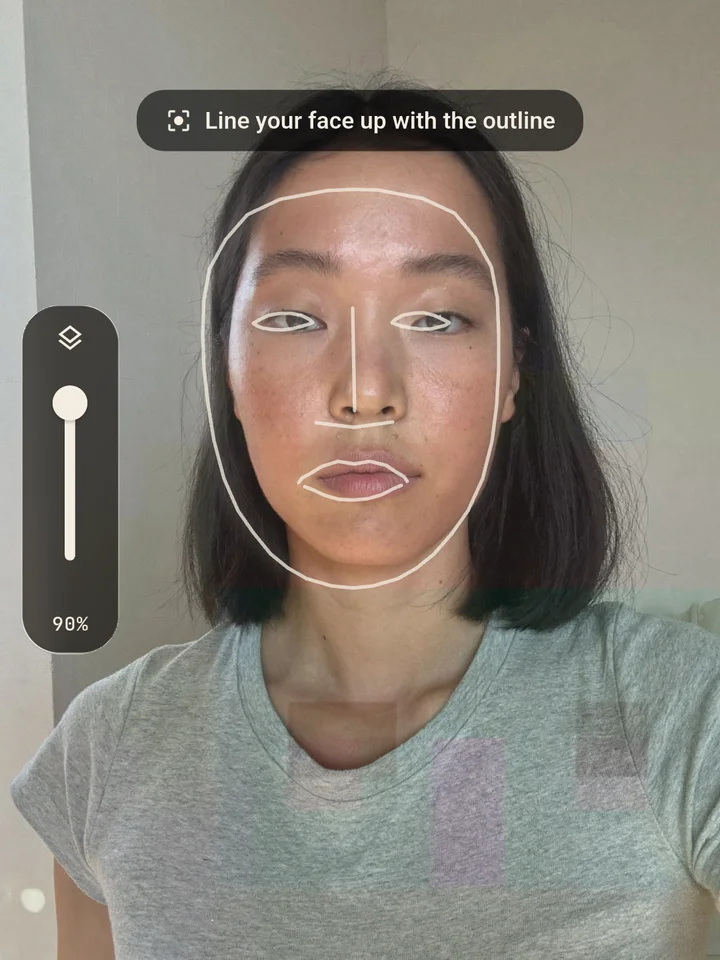
Auto capture, the self timer and face mode
Turn on auto capture and the shutter fires by itself once the frame lines up with the ghost, which helps most when the phone is propped on a shelf and you are standing back for a full body photo. The self timer is there as well, for a fixed delay.
SameShot picks a guide from your first photo. A face gets a face outline and a full body gets a body pose guide, both drawn live while you line up; for rooms, objects and plants you line up against the ghost itself. Face mode follows your face, so a selfie taken in a hotel bathroom lands in the same place as one taken at home. For one selfie a day, see the daily selfie app page and our guide to making a selfie time lapse.
The ghost never appears in the saved photo
The ghost is drawn on the screen only while you line up. The saved photo is the camera's own picture, with no faded copy of the last shot in it. After each shot SameShot also lines the new photo up with the first one in the project, and that alignment carries into the viewer, the before and after slider and the video. Saving to your gallery applies it too, so the copies you share already match.
A coloured line shows how well each photo lined up
Every photo in a project carries a thin line in red, amber or green that shows how well it lined up, and the full-screen viewer spells it out as Good, Fair or Poor. A run of green means the set should play back without jumps. A red line is a cue to retake the photo while you still can, before the haircut or the next coat of paint.
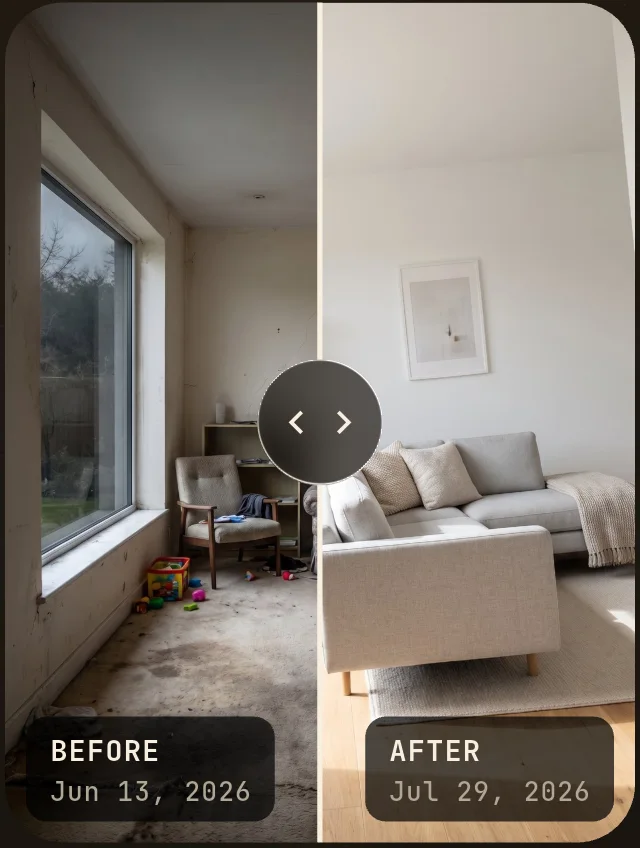
What you can make from the lined-up photos
Drag your thumb across the before and after slider to wipe between the first photo and the latest. Every photo in a project also exports as one time lapse video: shoot the project in 9:16 and it is ready for Reels, Shorts and TikTok, and Premium can reframe any project to another shape. You can stamp the date, Day 12 or Week 6 on a video or a before and after image, play a project in the app without exporting it, and type in a number such as weight or plant height with each photo to see it as a chart.
Already have photos you took without an overlay? The free progress photo time lapse maker turns them into a time lapse in your browser, and our guide to aligning progress photos by hand covers the manual route. For the camera itself, read how the ghost overlay camera works.
Overlay camera questions
What is an overlay camera?
An overlay camera shows an earlier photo, partly transparent, on top of the live camera view, so you can line up a new photo with the old one before you take it. People use one for progress photos, renovations and plants. SameShot is an overlay camera app for Android.
How do I overlay an image over my camera on Android?
Use a camera app that shows a previous photo over the live view. In SameShot, take the first photo of a project; from then on the last photo appears faint over the camera each time you open it. Drag the opacity slider to make it stronger or fainter, line up and shoot.
Does the overlay appear in the final photo?
No. The ghost is shown on the screen only while you line up the shot. The saved photo is the camera's own picture with no ghost in it, lined up with the first photo of the project.
Is there a free overlay camera app for Android?
Yes. SameShot is free on Google Play for Android 8.0 and newer, with ads. The ghost overlay, the opacity slider, auto capture and face mode are all in the free version. Premium, a one-time purchase, removes the ads and adds unlimited projects, App Lock, saving every photo at once and 1440 px video.
Does the overlay camera work offline?
Yes. Shooting, lining up, comparing and exporting all work in airplane mode, and the photos stay on your phone because SameShot has no photo server. Signing in and buying Premium need a connection, and usage statistics you can switch off and the ads in the free version use the network when it is there.

