
How to make a selfie time lapse with just your phone
Updated
A selfie time lapse is one photo of your face a day, played back fast enough that months of change fit into a few seconds. You need a phone, a spot you can come back to, and a way to keep your face in the same place in every frame. Most of this guide is about doing those three things for long enough to have something worth watching, and the rest covers turning the photos into a video.
How to make a selfie time lapse, step by step
- Pick a spot and a time of day you can repeat: a bathroom mirror, a hallway wall or a corner by a window you pass every morning.
- Fix the height and the distance. A strip of tape on the mirror at eye level and another on the floor where your toes go take the guessing out of it.
- Take one photo a day and line it up with yesterday's before you press the shutter, with your face relaxed and your eyes on the lens.
- Keep every photo in one album or one project, in date order, from the first day.
- When you have enough, put the photos together as a video at 8 to 12 frames per second, in 9:16 if it is going to Reels, Shorts or TikTok.
The sections below go through each step. On Android, our post on making a selfie time lapse on Android compares the ways to do the last step on that platform.
Why a selfie time lapse shows change you miss in the mirror
You see your own face every day, so a beard growing in, a haircut growing out or a few months of training blend into the background. A time lapse breaks that habit of the eye. Ninety daily photos played at 10 frames per second last nine seconds, and a change too slow to notice from one morning to the next becomes something you can watch in one go. Alignment decides whether it works: one tilted, off centre frame in a run of eighty lined up ones pulls the eye straight to it and away from your face.
What you need for a selfie time lapse
- A phone with a front camera, or a back camera and a mirror
- A spot you can return to every day, such as a bathroom mirror, a hallway wall or a corner with good light
- Any camera app, or a ghost overlay camera for less trial and error
- About a minute a day, for as long as the project runs
A tripod helps, though a face only time lapse works fine with the phone propped on a shelf or braced against a doorframe. What decides how the video looks is hitting the same angle, distance and light each day, and the guide to taking daily photos in the same spot covers choosing that spot and holding it for months.
Keep the angle, the distance and the light the same every day
Hold the phone at one height
If the phone sits a few degrees higher on Tuesday than on Monday, your chin seems to grow and shrink through the video, which looks like jitter even when your face has not changed at all. Pick one height; eye level is the easiest to repeat. A strip of tape on the mirror at that height beats memory.
Stand at one distance
Distance changes a face more than people expect. A study of selfies found that a photo taken 12 inches away made the nose look about 30% larger than an undistorted view, and that at 5 feet the effect essentially disappeared (Ward and colleagues, JAMA Facial Plastic Surgery, 2018). Hold the phone at arm's length one day and closer the next, and your face will swell and shrink in the video. Mark the floor where your toes go if you shoot into a mirror, or use a tile or a socket as the reference if the phone is propped up.
Use one light
Morning window light and evening lamp light already look different in a single photo, and across ninety frames the video flickers between warm and cool. Pick a time of day and keep it. A reminder set for that time does most of the work.
How SameShot keeps your face in place
Judging by eye whether you are standing where you stood yesterday is where many daily projects stall, and it is the job SameShot, the app we make, was built for. Face mode follows your face, so the selfie lands in the same place whether you take it in the kitchen, the car or a hotel room. Yesterday's photo sits faint over the live camera, auto capture can take the shot once your face lines up, and after each shot the app lines the photo up with your first one. Every photo in the project then plays back as one time lapse video. Tape and a daily reminder get you most of the way by hand; they ask a little more of you each morning.
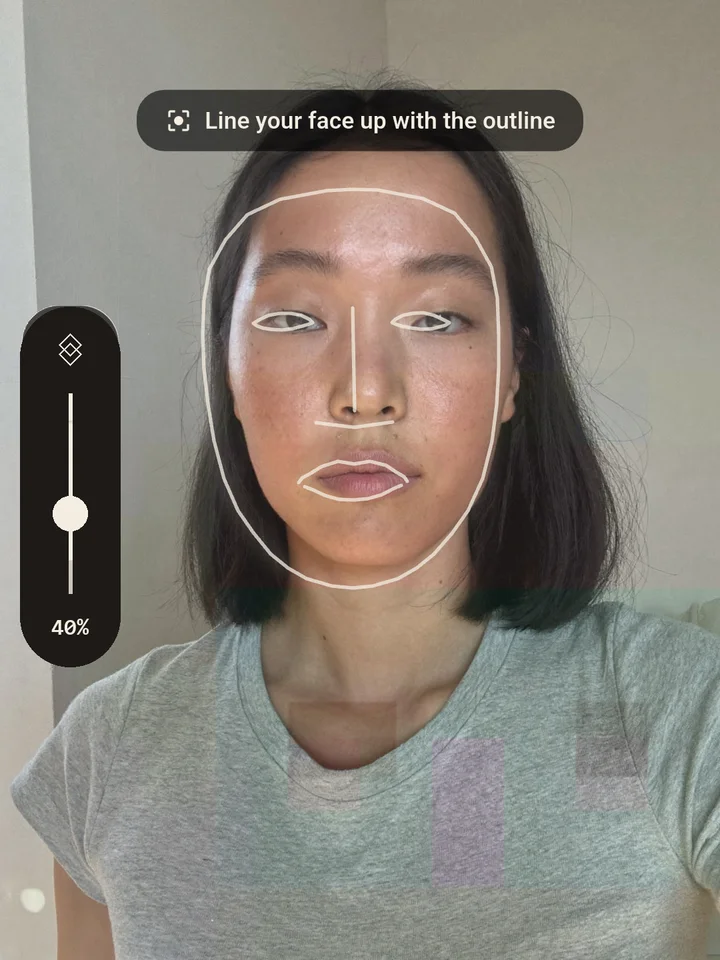
A daily routine you can keep for months
The habit fails more often than the technique. A few things keep it going past week two.
- Tie it to something you already do every day, such as brushing your teeth or getting out of the shower.
- Set one reminder with the project's name on it. SameShot reminds you on the weekdays you choose, and its streak forgives one missed day.
- Decide in advance what a missed day means. Skipping a day is better than faking one from your camera roll.
- Keep the photos in one album or one project from day one, so you never have to sort a hundred images by date at the end.
Can your phone's time lapse mode make a selfie time lapse?
Most phone cameras have a Time Lapse mode, and it does a different job. It records one continuous video and speeds it up: Google's help page for the Pixel camera says that for 20 minutes in reality to take 10 seconds in the video, you pick 120x (Pixel Camera Help). That suits a sunset or clouds moving over a hill. A selfie time lapse covers weeks or months, so it is built from separate photos, one a day, put together afterwards.
How to turn daily selfies into a video
Once you have a run of photos, there are four common routes.
- Google Photos on Android can make an animation from photos you select: tap Create, then Animation. Its help page says you cannot speed up or slow down an animation, so you have no control over the pace (Google Photos Help).
- A general video editor works if you set the length of each photo yourself. CapCut, which is free to download, has its own guide that walks through importing the photos, setting each one's duration on the timeline and exporting (CapCut). You crop and line up every photo before it goes in; the editor will keep a frame where you stood a foot to the left.
- Our free progress photo time lapse maker turns photos you already have into a video in your browser.
- An app built for this keeps the photos in order and lines each one up as you go, so the export is one step. In SameShot every photo in the project becomes one video, with an optional date, Day N or Week N stamp. The free version renders in HD, in the project's own shape, with hard cuts; Premium adds 1440 px, smooth transitions and reframing to another aspect ratio.
If you already take daily selfies, the daily selfie app page shows how SameShot handles them from the first photo.
How many photos make a 20 second time lapse?
The length of a photo time lapse is the number of photos divided by the frame rate. At 12 frames per second, 20 seconds takes 240 photos, which is 240 days of daily selfies; at 24 frames per second it takes 480, and at 10 it takes 200. The table shows a few common runs.
| Photos | At 10 fps | At 12 fps | At 24 fps |
|---|---|---|---|
| 30 (a month of daily selfies) | 3 s | 2.5 s | 1.3 s |
| 90 (about three months) | 9 s | 7.5 s | 3.8 s |
| 180 (about six months) | 18 s | 15 s | 7.5 s |
| 365 (a year) | 36.5 s | 30.4 s | 15.2 s |
Daily selfies usually look best between 8 and 12 frames per second: much slower drags, and much faster flashes past before the eye settles. The free time lapse calculator works out other combinations, and our post on how many photos a time lapse needs goes through the sums.
Export settings for Reels, Shorts and TikTok
| Setting | What to pick |
|---|---|
| Aspect ratio | 9:16, vertical. Choose it at the first photo, since a frame you never shot cannot be added later. In SameShot, picking 9:16 for a new project is free. |
| Frame rate | 8 to 12 fps for daily selfies. At 10 fps, 90 photos make 9 seconds. |
| Size | The largest your editor offers for vertical video. SameShot's free version renders in HD up to 1280 px; Premium renders at 1440 px. |
| Length | Short enough to watch twice. A year of daily selfies at 24 fps runs about 15 seconds. |
| Music | Choose the track after you see the pacing. A song much faster than the cut fights the picture. |
Mistakes that spoil a selfie time lapse
Moving the setup halfway through
With a fixed spot, moving from the bathroom mirror to a different wall three weeks in breaks the sequence. Treat a move as a new project, or use a camera that follows your face, where the room can change.
Cropping each photo by eye at the end
Cropping every photo by hand at export time brings back the drift you avoided while shooting. Crop once, to the same frame every time.
Faking a missed day
A missed day means one frame fewer, and the video still works. A stand in, such as an old selfie taken at a different angle, shows up as a visible glitch.
Letting the background change too
Different rooms, clutter and light sources compete with your face for attention. Keep the frame plain everywhere except the one thing meant to change. Face mode keeps your face in place, and the room behind you still shows in every frame of the video.
Selfie time lapse questions
How many photos do I need for a selfie time lapse?
There is no minimum. Divide the number of photos by the frame rate to get the length: 30 daily selfies make 3 seconds at 10 frames per second, and 90 make 9 seconds. A month is enough to test the routine, and a few months give slow changes such as a beard or a haircut time to show.
How do you make a selfie timelapse?
Take one selfie a day from one spot, at one distance and in similar light, keep the photos in date order, then put them together as a video at about 8 to 12 frames per second. A ghost overlay camera such as SameShot helps with the daily part by showing yesterday's selfie faint over the live camera.
How do I take a timed selfie?
Turn on the self timer in your camera app, prop the phone against something solid at the height you use every day, press the shutter and step into place. SameShot has a self timer with preset and custom delays, and auto capture can take the photo by itself once your face lines up with the ghost.
Can I make a selfie time lapse for free?
Yes. Google Photos on Android can turn selected photos into an animation, though you cannot change its speed. CapCut, which is free to download, publishes a guide to building a time lapse from photos. SameShot is free too: the free version shows ads, keeps one project and renders every photo into an HD video in the project's own shape, and Premium, a one-time purchase, adds 1440 px, smooth transitions and reframing.
How do I keep my face in the same place in every photo?
Fix the height and the distance with a mark on the mirror and a mark on the floor, shoot at about the same time each day, and look straight at the lens. A ghost overlay camera does the matching on screen: SameShot's face mode follows your face and shows yesterday's selfie over the live view, so the room behind you can change from day to day.
Which app is best for a selfie time lapse?
It depends on your phone and on whether you want help lining up each photo or only stitching finished photos together. Our comparison of progress photo apps for Android covers the options, including SameShot, which we make.
Get SameShot on Google Play
Face mode keeps each selfie lined up with yesterday's, and the whole run plays back as one time lapse video on your phone.

SameShot: Progress Photo Cam
By Appynox, on Google Play

Free with ads; a single Premium payment removes them. Needs Android 8.0 or newer.