
The daily selfie app that lines up with yesterday's selfie
SameShot is a daily selfie app for Android. It shows yesterday's selfie faint over the live camera, and face mode follows your face wherever you take the photo, so each new selfie lands in the same place and a year of them plays back as one face time lapse. Free on Google Play; the iPhone version is in development.
Free for Android 8.0 and newer, with no account needed.
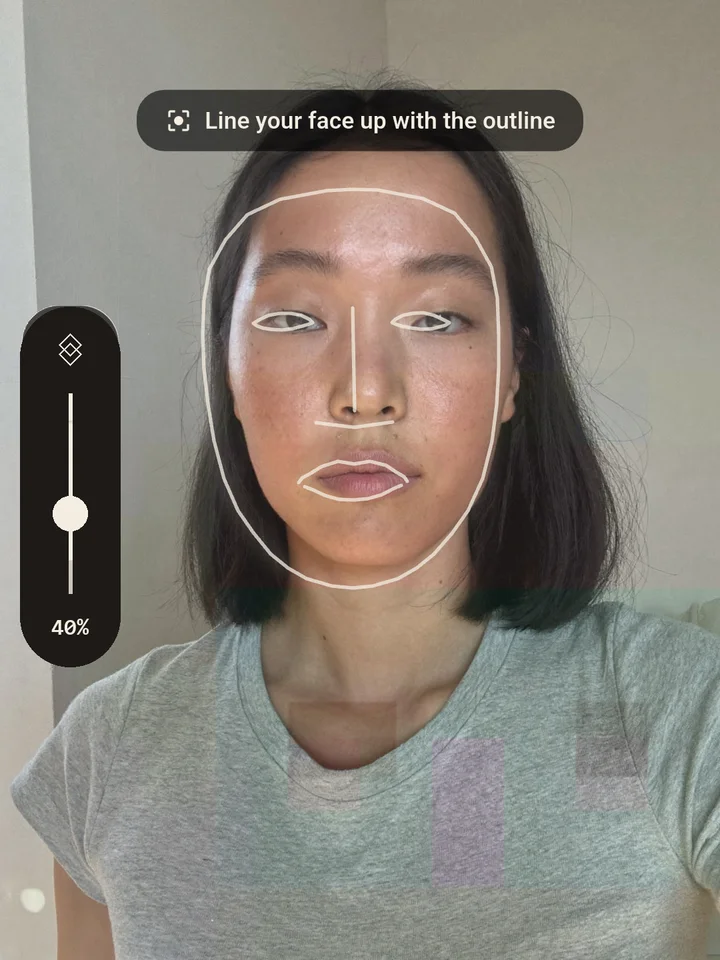
How the ghost of yesterday's selfie lines up today's
Open the camera in a face project and yesterday's selfie appears faint over the live view, at 40% opacity to start. A slider on the left takes it from 0 to 100%: up when the ghost is hard to see, down when it hides your face. Move until your eyes, nose and mouth sit on yesterday's, then shoot.
Face mode follows your face, so the room behind you can change: a selfie in the kitchen on Monday and one in a hotel room on Saturday both put your face in the same part of the frame.
With auto capture on, the shutter fires by itself once your face lines up. After each shot SameShot also lines the new selfie up with your first one, so the before and after slider and the video come out matched. Our page on how the ghost overlay camera works has the details.
How to make a selfie time lapse in four steps
A selfie time lapse is a run of still photos, one a day, played fast enough to read as a moving face. Your camera's Time Lapse mode speeds up one continuous recording, so it cannot stretch across months, and a daily series needs stills.
-
Start a face project and choose its shape
Create a project for your face and take the first selfie. Choosing 9:16 at the first photo is free and gives you a vertical video for Reels, Shorts and TikTok later. The free version keeps one project; Premium has no limit.
-
Keep the same distance and the same light
Hold the phone at the same distance every day, or prop it up and use the self timer. A 2018 study in JAMA Facial Plastic Surgery found that a selfie taken 12 inches away makes the nose look about 30% larger than an undistorted view, while at 5 feet the difference all but disappears. For light, a lamp you switch on every time is easier to repeat through the year than a window.
-
Take one selfie a day against yesterday's ghost
Line your face up with the faint copy of yesterday's selfie and let auto capture take the shot. A reminder arrives on the weekdays you choose, and the streak counter forgives one missed day, so a busy Thursday does not wipe out a month.
-
Export the run as a time lapse video
Play the project in the app and change the speed as it runs, then export it. Every photo goes into one video, with the date, Day 12 or Week 6 stamped on it if you like. The free version renders HD up to 1280 px in the project's own shape with hard cuts; Premium renders 1440 px with smooth transitions and can reframe to 1:1, 9:16, 16:9 or 4:5.
Our step by step guide to making a selfie time lapse with your phone covers export settings for Reels and TikTok, and the glow up timeline setup covers where to stand and how often to shoot.
Import the selfies you already took
Already have a camera roll full of selfies? Pick them through the Android photo picker and SameShot slots each one into the timeline by the date it was taken, crops it to match your first shot and lines it up with the rest.
Lining up after the fact can move and scale a photo. It cannot change the light, or the height and angle the phone was held at, so an old selfie taken from below will still look different from the ones you line up against the ghost. To turn a folder of old selfies into a video once, the free progress photo time lapse maker works in your browser.
SameShot compared with a photo-a-day app and the camera roll
Three common ways to keep a daily selfie series differ mostly in when the face gets lined up.
| Question | SameShot | A photo-a-day app that aligns afterwards | Camera roll (Google Photos) |
|---|---|---|---|
| When the face is lined up | Before the shot, against yesterday's ghost, then again after it | After the shot: the app finds your eyes and moves each photo to match | Only if you line photos up by hand in an editor |
| Distance and angle | Matched by you in the viewfinder | Whatever you shot; moving a photo cannot change its angle | Whatever you shot |
| Making the video | Every photo, in the app; HD free, 1440 px and reframing with Premium | Built in; settings vary by app | A quick animation of selected photos, with no speed control |
| Where photos are kept | On your phone; there is no photo server | Depends on the app; see its Data safety section on Google Play | On your phone, and in your Google account when backup is on |
| Cost | Free with ads; Premium is a one-time purchase | Free, paid or subscription, by app | Free with the phone |
| A good fit when | You want each selfie lined up before you take it | You already have selfies and want the eyes matched for you | You want a quick animation of a few photos |
The camera roll column describes Google Photos on Android, from Google's help page on animations. Photo-a-day apps vary, so check a listing for the feature you need.
Where your selfies are kept
Your selfies are saved on the phone and nowhere else, and the face detection behind face mode runs on the phone too. The app does use the network for usage statistics you can switch off, ads in the free version and an optional sign-in, and none of those carries a photo. App Lock (Premium) asks for a fingerprint, face or PIN before the app opens. The privacy policy lists everything that goes online.
Daily selfie app questions
What is the app where you take a picture every day?
It is called a daily selfie app or a photo-a-day app: you take one picture a day, usually of your face, and the app plays the set back as a time lapse video. SameShot is one for Android; it shows yesterday's photo faint over the camera so each new one lines up.
Is there a daily selfie app for Android?
Yes. SameShot by Appynox is free on Google Play for Android 8.0 and newer. Face mode and a faint copy of yesterday's selfie line up each new photo, and the set exports as a time lapse video. The free version shows ads, and the iPhone version is in development.
How do I make a selfie timelapse?
Take one selfie a day at the same distance and in similar light, keep your face in the same place in every frame, then join the photos into a video. SameShot does the lining up with a ghost of yesterday's selfie and exports the whole project as one video.
Can I add selfies I took before installing the app?
Yes. Import them through the Android photo picker and SameShot sorts them by the date they were taken, crops them to match your first shot and lines them up. It cannot change the light or the angle an old photo was taken from.
Do I need to take the selfie in the same room every day?
No. Face mode follows your face, so the kitchen, the car or a hotel room all work. Light and distance change the look of a series more than the room does, so keep those two the same where you can.
How long will my selfie time lapse be?
Divide the number of photos by the frame rate. A year of daily selfies is 365 frames: about 30 seconds at 12 frames a second, or about 15 seconds at 24. SameShot sets the speed with a slider when you export, and it uses every photo.
Is SameShot free?
Yes, with ads, and no account is needed. The camera, face mode, auto capture, reminders, imports, the slider and full-length videos are free, and the free version keeps one project. Premium, a single payment, removes the ads and adds unlimited projects, App Lock, saving every photo at once and 1440 px video.

