
A glow up timeline where none of the selfies jump
A glow up timeline works when your eyes stay in the same place from one selfie to the next. If they wander, the video jitters and the slow change hides behind the movement; if they hold their place, months of small changes in skin, hair and style play as one continuous shift.
For a step by step version with export settings for Reels and TikTok, read how to make a selfie time lapse with just your phone.
SameShot is a free progress photo app for Android, made by Appynox. The iPhone version is in development.
How often to take glow up progress photos
Every day. Faces change in small daily steps, and a selfie takes seconds, so once a day is easy to keep up. A missed day barely shows in the video, and the streak counter forgives one missed day, so a busy week does not end the project.
Every subject has its own pace; the article on how often to take progress photos compares them side by side.
Daily selfie setup: light, expression and eye line
-
Start with a face photo
SameShot picks the guide from your first photo, so a first selfie sets the project up in face mode. Face mode follows your face, which means the room behind you can change from day to day and the selfie still lands in the same place.
-
Pick a window and an hour
Indirect window light at about the same time each day. A face photo is mostly a lighting photo, and the same window every morning gives a far smoother video than the same room at random times.
-
Keep one expression
Pick a neutral face and keep it. Smiling in half the frames makes the lower face jump in the video, and that movement hides the slow changes you are tracking.
-
Put your eyes on the ghost's eyes
Match your eyes to the eyes in the faint previous selfie first, then check the chin. Hair and jaw position change with mood and posture, and the eye line is what the whole video turns around.
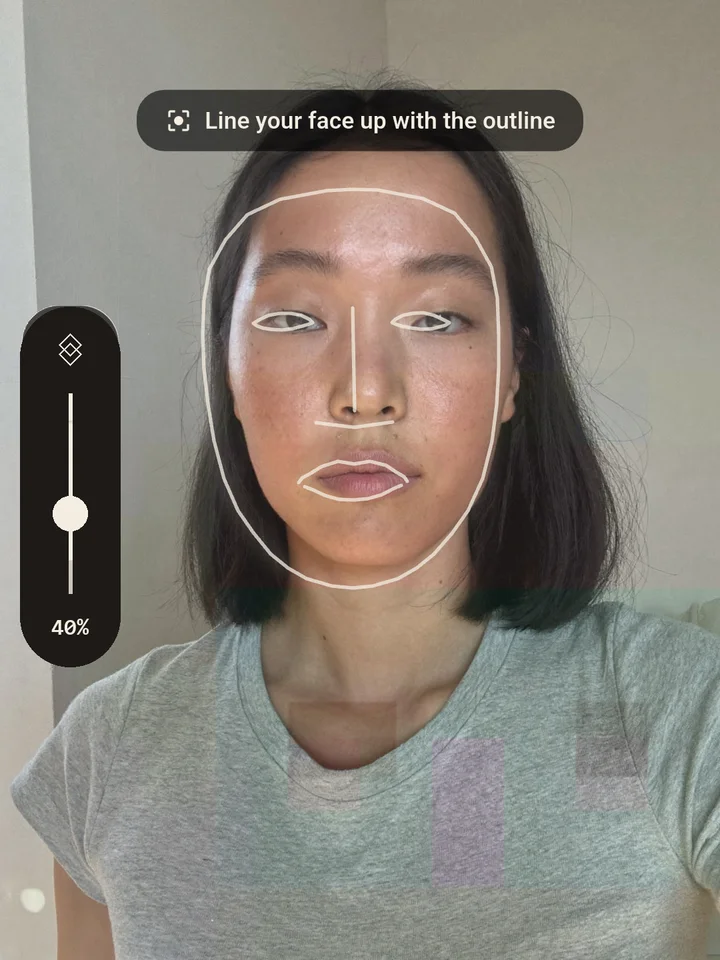
What face mode shows in the camera
The camera draws an outline of your face and lays your last selfie over the live view at 40%, with a slider on the left to make it fainter or stronger. Face mode follows your face using face detection that runs on the phone, so the selfie lines up in the kitchen, the car or a hotel room. After each shot the app also lines the selfie up with your first one and marks how closely it matched with a thin red, amber or green line.
- If you are choosing an app, see SameShot as a daily selfie app for Android.
- Already have months of selfies in your camera roll? Make a time lapse from photos you already took, free in your browser.
- To plan how long the video will run, use the time lapse calculator.
Common glow up photo mistakes
- Switching between the front and the rear camera. The lenses differ, so your face changes shape halfway through the video.
- A ceiling light on some days and a window on others.
- Holding the phone at arm's length, which changes the distance a little every day.
- Skipping the plain days in the middle. They are what let the change between the first and the last selfie read as a change.
Glow up progress photo questions
How do I make a glow up timeline?
Take one selfie a day from the same distance, in the same light and with the same expression, and line each one up with the previous selfie before you shoot. Then play the set back as a video: SameShot exports every photo in the project as one time lapse, sized for Reels, Shorts and TikTok if you shot the project in 9:16.
What apps do people use for glow up photos?
Two kinds. Many glow up apps put AI filters or beauty effects on a face, which changes the photo itself. SameShot saves each selfie as you took it, with no retouching or smoothing, and lines it up with the last one, so the timeline shows the change that happened.
How long before a glow up time lapse shows a change?
It depends on what is changing. A new haircut or a beard shows within days or weeks, while skin and the shape of a face take longer. A month of daily selfies gives you about thirty frames, which plays for two and a half seconds at 12 frames per second.
What is face mode?
Face mode lines the photo up with your face, using face detection that runs on the phone. Your daily selfie lands in the same place even when the room behind you is different, and the camera shows an outline of your face to line up with.
Are my selfies uploaded?
No. SameShot has no photo server and no code that uploads a photo, and face detection runs on the phone. The app does use the network for usage statistics you can switch off, ads in the free version and an optional sign-in; none of those carries a photo, and the privacy policy lists each one.
Other things people track with SameShot
Get SameShot on Google Play
Start a project today. The first photo you take becomes the ghost that the second one lines up against.

SameShot: Progress Photo Cam
By Appynox, on Google Play

Free with ads; a single Premium payment removes them. Needs Android 8.0 or newer.