
Best app to take daily photos in the same spot
Updated
A photo from the same spot every day sounds simple until about day forty. The phone ends up a little higher, you stand half a step closer, and photo forty seven no longer lines up with photo one. The hard part is memory: nobody can hold an exact stance in their head for ninety days, so the spot has to be held by something on the floor, on the wall or on the screen. This guide covers the manual setups, what an app should do, and where SameShot, the app we make, fits.
Where daily photos in the same spot come up
The daily selfie is the obvious case: a face or a body tracked over weeks or months, where small shifts in distance or angle make it hard to tell what changed. The same problem turns up anywhere a photo has to repeat. A plant on a windowsill, photographed each morning for a growth time lapse, needs the pot in the same corner of the frame every time, or part of the growth you see is the camera moving. A builder documenting a job shoots from the same corner on every visit so the client can watch the structure go up, and a photo taken three feet to the left looks like a different building. Parents who photograph a child against the same wall run into it too, in a hallway that gets rearranged every few months.
If a daily selfie is your project, the daily selfie app page shows how face mode handles it, and the selfie time lapse guide covers the routine from the first photo to the finished video.
Why the position drifts from one day to the next
Nobody sets out to take photos that do not line up. What happens is smaller: you stand two inches left of yesterday, you hold the phone at chest height because your arm is tired, or you step half a pace closer because the room feels cramped. None of it registers at the time. Stack thirty of those small errors and the set drifts, so a jawline looks different, a wall looks closer or a plant seems to grow sideways when nothing in the world moved except the camera. Each photo looks fine on its own, and the drift only shows when you put them side by side or play them as a time lapse, by which point week two cannot be shot again.
Tape, tripods and where manual setups stop working
The classic fix is to mark the world and stop relying on memory. A cheap phone tripod or a flexible mount, plus a strip of tape on the floor for your feet (or an L of tape if your rotation matters too), gets you most of the way. Mark the phone's height on the mount with a pen so nobody resets it by accident. For objects, the same idea works with a fixed edge in the room: line up a windowsill, a tile line or the corner of a doorframe in the same place in the frame every time, and the room becomes your grid.
Where this breaks down is easy to predict once it has happened to you. Travel ends it at once, because a hotel room has no tape and no marked spot, and you start from nothing every night of the trip. Handing the phone to someone else breaks it as well: their height, grip and habits are different, and careful instructions do not carry over the feel you built up over weeks. Setups also wear out on their own schedule, as tape peels underfoot, a mount gets knocked and never quite goes back, or the wall you used as a reference line gets painted.
What to look for in a same spot camera app
Once tape and memory stop being enough, a handful of specific features matter more than a long list of photo organiser extras.
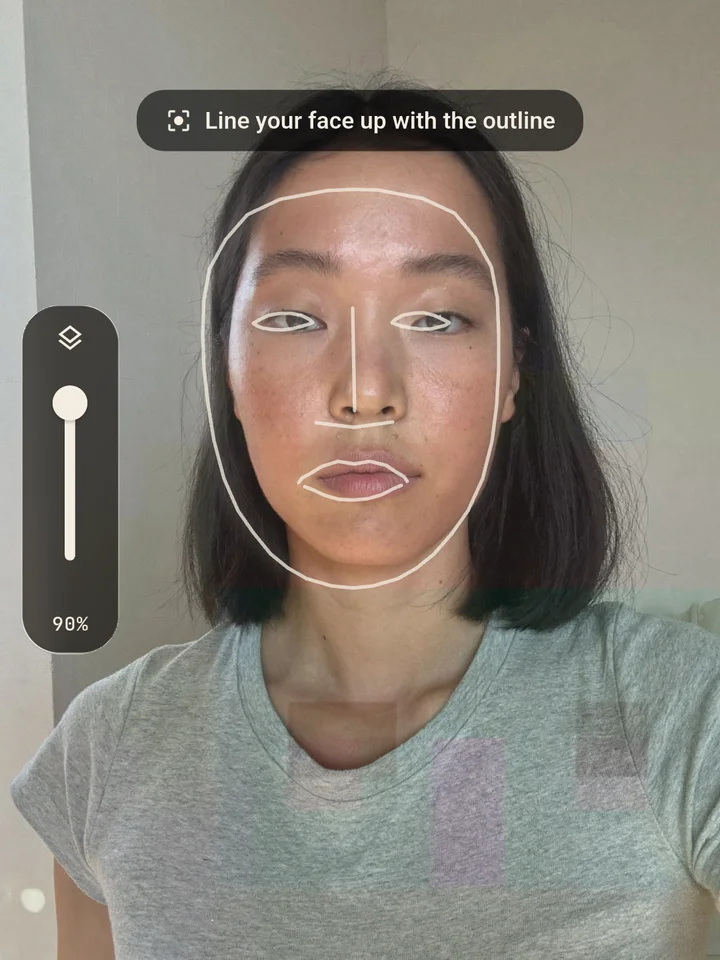
- The last photo shown live in the viewfinder while you frame the next one.
- An opacity control, so you can turn the ghost down until it guides you without hiding the scene you are framing.
- Some signal beyond your own eye that the frame is close enough, such as an automatic shutter or an alignment indicator.
- Reminders and a streak, because keeping the habit going is often harder than lining up the shot.
- Clear storage: progress photos are often the pictures you least want in someone else's cloud, so check where an app keeps them before you start a long project.
Three ways to keep daily photos in the same spot, compared
The three options below each solve a different part of the problem, so it helps to know which part you need help with. Our post on ghost overlays and grid lines compares the first and last in more depth.
| Approach | What it solves | What it leaves to you |
|---|---|---|
| The phone's own camera with grid lines | Free and already on your phone. The grid helps you square up the horizon and the framing. | The grid has no idea what yesterday's photo looked like, so position still depends on your memory and your tape marks. |
| Reminder and interval apps | The habit: you pick up the phone every day. | Lining up, if the app does not show the previous frame. Then it is done by eye. |
| Ghost overlay camera apps | Show the last photo live in the viewfinder, so you line up while you frame the shot. | There are fewer of them to choose from, and storage differs, so check where each one keeps your photos. |
Where SameShot fits
SameShot is the app we build, and it sits in the ghost overlay row of that table. The camera holds your last photo over the live view at 40% opacity to start, with a slider from 0 to 100% so you can fade it in or out. Auto capture can take the photo once the frame lines up, and face mode follows your face, so a daily selfie lands in the same place in the kitchen, the car or a hotel room. After each shot the app lines the photo up with the first one too, and a red, amber or green line on each photo shows how close the match was. Reminders arrive on the weekdays you choose.
Photos stay on your phone; there is no photo server. SameShot is free on Google Play for Android, with ads and one project in the free version, and the iPhone version is in development. Once you have a run of daily photos, every photo in the project plays back as a time lapse video, and the free progress photo time lapse maker does the same in a browser for photos taken with any camera.
Questions about daily photos in the same spot
Is there an app that shows the previous photo while taking a new one?
Yes. These are called ghost overlay cameras. The viewfinder shows your last photo, faded, on top of the live camera, so you can move until the new frame lines up with the old one before you shoot. Photo comparison apps are a separate kind of tool: they show two photos side by side after both have been taken.
How do apps keep daily photos aligned?
Most use one or more of three things. A live overlay of the previous photo with an opacity slider lets you match the ghost before shooting. An automatic shutter or an on screen signal tells you when the frame is close enough. A level and a grid fix tilt and the horizon, though you still have to remember where you stood. SameShot also lines each photo up with the first one after you take it.
Can I get reminders to take a daily photo?
Progress photo apps usually include a reminder and a streak counter, much like a habit tracker. SameShot reminds you on the weekdays you pick, and its streak forgives one missed day. With a general camera app you have to set the reminder yourself in your phone's clock or calendar and keep count of the days.
Get SameShot on Google Play
Start a project today. The first photo you take becomes the ghost that the second one lines up against.

SameShot: Progress Photo Cam
By Appynox, on Google Play

Free with ads; a single Premium payment removes them. Needs Android 8.0 or newer.