
Ghost overlay, grid lines or align it afterwards?
Grid lines divide the frame but know nothing about your last photo, so they catch big framing errors and miss slow drift. Alignment software sees both photos only after the shot, so it can shift, scale and rotate away small differences and cannot change the angle you shot from. A ghost overlay shows the last photo while you can still move, so most of the error is fixed before the shutter. SameShot uses both: the ghost before the shot, and automatic alignment after it.
A repeat photo can be made to match the last one at three moments: before you shoot, while you shoot, and after you shoot. Each moment has its own tool, and the three know very different things about your last photo.
Grid lines: a ruler with no memory
Turning on the camera grid gives you two vertical and two horizontal lines. You can put a shoulder on one, or the edge of a doorway, and come back to roughly the same place next week.
That helps. Compared with framing by eye, thirds lines cut the obvious errors: a subject drifting to one side of the frame, a horizon sliding up and down.
The limit is that the grid is the same in every photo. It has never seen your last shot. It cannot tell you that you are standing thirty centimetres closer than in week one, that the phone sits four centimetres lower because you used a different shelf, or that the camera has turned a few degrees over two months.
Those small errors are the ones that spoil a comparison, because each is too small to notice on the day and they add up over the weeks. A grid catches gross errors and misses slow drift, which is the kind that happens.
Aligning afterwards fixes small shifts and keeps the angle you shot
The software approach is to take the photos however they come, then load them into something that shifts, scales and rotates each one until it overlaps the others.
For small differences this works. It costs two things.
The edges get cropped. Making two differently framed photos share one frame means cutting away the parts only one of them has. On a full body photo, the edges are often the outline you wanted to compare.
The pixels get resampled. Rotating or scaling an image means working out each new pixel from its neighbours in the original. On screen that is invisible, and it does mean the aligned copy is a reworked version of what the sensor recorded.
Under both sits a harder limit: no software can recover an angle you did not shoot from. If this week’s photo is three quarters on and last week’s was front on, no correction turns one into the other.
So alignment after the shot is a good finishing step for photos that are already close, and a poor rescue for photos that are far apart. SameShot uses it that way. Since version 1.0.5, each new photo is lined up with the project’s first photo automatically, in the viewer, the before and after slider and the video, after the ghost has already brought the frame close.
Ghost overlay: the last photo, while you can still move
A ghost overlay draws the last photo, faded, on top of the live camera. You move until the faded image and the live one agree, then shoot. In SameShot the ghost opens at 40% opacity, and a slider sets it anywhere from 0 to 100%.
What sets it apart is the timing. The information arrives while you can still act on it: if you are standing too close, you see the gap between the two outlines and step back. It also compares against the right reference, the photo this one will sit next to in the slider and the video.
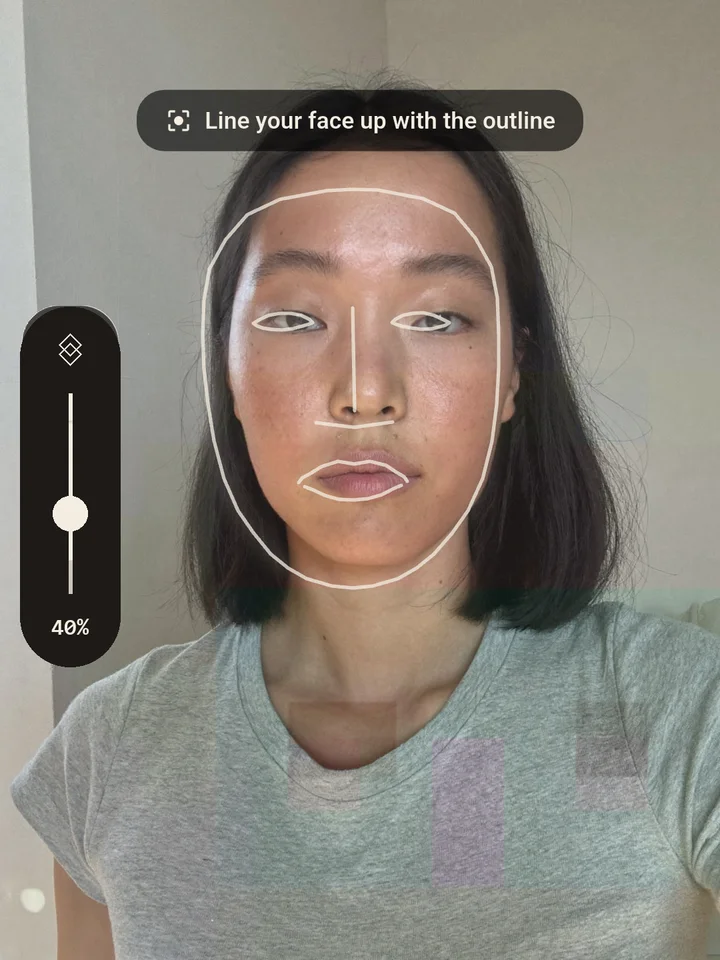
In practice that gives you three things.
Drift shows up on the day. A change in distance or height appears as a visible gap between the ghost and the live picture, so you correct it in the session where it happens.
The ghost stays on the screen. Nothing of it is saved into the photo.
It works on subjects with no straight edges. A plant has nothing to put on a grid line, but last week’s silhouette is a clear target. SameShot’s Plant Growth projects also line up the pot rim, so a potted plant lands in the same place each time.
What each method knows, and when it knows it
Grid lines
- ✕ Has never seen your last photo
- ✓ Acts before the shutter
- ✕ Misses slow drift
- ✓ Leaves the photo as you shot it
Align afterwards
- ✓ Sees your last photo
- ✕ Acts only after the shutter
- ~ Fixes small shifts, keeps the angle
- ✕ Crops and resamples the copy
Ghost overlay
- ✓ Shows your last photo
- ✓ Acts before the shutter
- ✓ Shows drift while you shoot
- ✓ Leaves the photo as you shot it
Side by side
| Grid lines | Align afterwards | Ghost overlay | |
|---|---|---|---|
| Knows your last photo | No | Yes | Yes |
| Acts before the shutter | Yes | No | Yes |
| Catches slow drift in distance | No | Partly, by scaling | Yes, while you shoot |
| Fixes a change of angle | No | No | Yes, you move before you shoot |
| Crops or resamples the photo | No | Yes | No |
| Works on subjects with no straight edges | Poorly | Depends on the software | Yes |
| Needs an app | No | Yes | Yes |
When grid lines are enough
Not every project needs an overlay. If you photograph something with strong straight edges, from a doorway you could find with your eyes shut, once a month for a year, grid lines and some care will get you there: twelve frames, big changes between them, and little harm if one is slightly off.
An overlay earns its place when any of these is true: the subject changes slowly enough that small framing errors compete with real change; you are shooting dozens of frames, so drift has room to build up; the subject has no strong straight edges; or you want a time lapse, where one badly framed photo shows up as a jolt.
That covers most body, face, skin, hair and plant projects, and any renovation someone intends to show a client.
What none of the three can fix
None of them controls the light. A ghost overlay will let you take a well aligned photo under a ceiling lamp when the previous eleven were taken facing a window, and that frame will look wrong for reasons that have nothing to do with framing.
Distance, height and angle are three of the four things that decide whether two photos compare, and light is the fourth. The post on why before and after photos do not match goes through all four.
Frequently asked questions
Do camera grid lines help with progress photos?
A little. Thirds lines give you something to place a shoulder or a doorway against, which cuts drift compared with nothing at all. The grid is the same in every photo, though, and knows nothing about where you stood last time, so it cannot catch a slow shift in distance or height.
Can an app align my photos after I have taken them?
Yes, for small differences. Software can shift, scale and rotate a photo until it overlaps another, cropping the edges as it goes. It cannot recover an angle you never shot from, so it works best on photos that were already close. SameShot lines each photo up with the first one automatically after you take it, and the ghost overlay gets the frame close before that.
What is a ghost overlay camera?
A camera that draws your previous photo, semi-transparent, over the live preview, so you can move until the two line up before you take the shot. The ghost is a guide on the screen and is never saved into the photo.
Which method is best for renovation photos?
A ghost overlay, because rooms have strong straight edges that make matching quick. Grid lines come second. Aligning afterwards struggles with rooms, since a change in where you stood changes the perspective of every wall, and correcting that bends the whole frame.
Line up your next photo with SameShot
SameShot shows your last photo faint over the live camera, so each new one lands in the same place. It is free on Google Play for Android.

SameShot: Progress Photo Cam
By Appynox, on Google Play
