
How to take weight loss progress photos you can compare
A weight loss photo changes with more than your body. Step a little closer to the lens, tilt the phone down, or shoot in the evening after two meals, and the picture moves by more than a week of progress. This guide covers the setup that keeps those things fixed from one session to the next.
Using SameShot already? The weight loss use case has the project setup and a sample series. Everything below works with any camera.
Shoot every one or two weeks, on the same weekday
Body weight and the way a body looks both move from day to day, so a daily photo mostly records the day. In a study of 80 adults who weighed themselves every day, weight was highest on Sunday and Monday and fell through the week, with the rise starting on Saturday (Orsama and colleagues, 2014). Some of that swing shows in photos too, so pick one weekday and keep it.
Shoot in the morning, after the bathroom and before you eat or drink. Every one or two weeks leaves enough change between two photos to see, and on the weekday you pick SameShot can send you a reminder.
The three angles to shoot: front, side and back
A front photo alone hides the waist and lower back, which the side view shows. Take all three, relaxed, and hold the same posture each time.
- Front: feet about hip width apart, arms hanging a little away from your sides, stomach neither held in nor pushed out.
- Side, turned a full 90 degrees: arms down or hands resting on the front of your thighs, so the outline of your stomach and lower back stays clear.
- Back: facing straight away from the phone, on the same foot marks, with the same arm position as the front.
In SameShot each angle can be its own project with its own ghost. The free version keeps one project, so make that the side or the front view; Premium has no limit on projects.
Where to put the phone: height and distance
Prop the phone upright at about belly button height, square to you, with no tilt. Tilt it down and your head looks bigger and your legs shorter; tilt it up and the opposite happens.
Distance matters as much as height, because whatever sits nearest the lens looks bigger. In a 2018 study of selfie distortion, a photo taken from 12 inches made the nose look about 30% larger than a distortion-free projection, while at 5 feet, a standard portrait distance, the difference all but disappeared (Ward and colleagues, JAMA Facial Plastic Surgery). That study measured faces, and the same optics apply to a body, so stand at least 5 feet (about 1.5 metres) back and use the self timer.
- Find a spot with a plain wall behind you and room to stand back.
- Put a strip of painter’s tape on the floor where your toes go, and note where the phone sits.
- Set the phone at belly button height, upright, and start the self timer or auto capture.
- Line your outline up with last session’s photo before the shutter fires.
Light and clothes that stay the same
Strong side light or a single ceiling spot draws deep shadows across the stomach, and those shadows move every time you stand a little differently. Use one soft light in front of you, such as a window on a bright day or a lamp bounced off a wall, and keep to it: switching between daylight and warm bulbs from one session to the next changes skin tone and contrast.
Wear the same fitted shorts or swimwear each time, at the same height on your hips, because a waistband that sits higher one week changes the outline of the waist in the photo.
Lining up each session with the last one
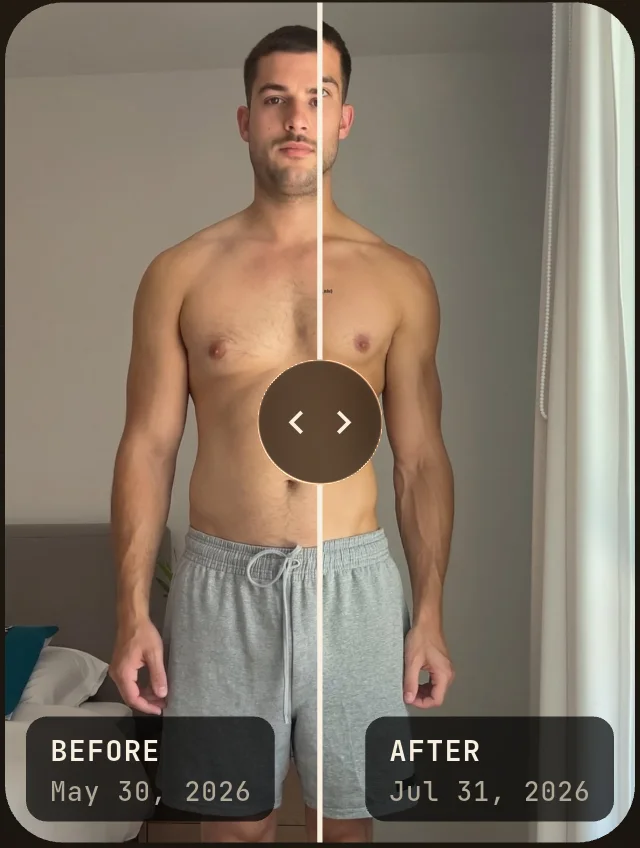
Tape marks get you close, and the last photo gets you the rest of the way. SameShot shows the previous photo as a faint ghost over the live camera, with its opacity on a slider, so you can match your feet, shoulders and head to it before you shoot. Auto capture can fire the shutter once you line up, and the app also lines each saved photo up with your first one after the shot.
You can type a weight or waist number in with each photo, and SameShot shows it as a chart next to the pictures. A review of 22 studies on diet logs, exercise logs and self-weighing found a consistent link between keeping records and weight loss, though the authors rated the evidence as weak because of how the studies were run (Burke and colleagues, 2011).
The photos stay on your phone; SameShot has no photo server. The app does use the network for usage statistics you can switch off, ads in the free version and an optional sign-in, and none of those carries a photo. The privacy page lists each one, and App Lock (Premium) adds a fingerprint, face or PIN check before the app opens.
After a few months, export the series as a time lapse video from the app, or drop the photos into the free progress photo time lapse maker in your browser.
Weight loss photo checklist
| How often | Every one or two weeks, on the same weekday |
|---|---|
| When | Morning, after the bathroom and before food or drink |
| Angles | Front, side at 90 degrees and back, all relaxed |
| Phone | Upright at belly button height, at least 5 feet (1.5 m) away, on the self timer |
| Light | One soft source in front of you, the same one each time |
| Clothes | The same fitted shorts or swimwear, at the same height on the hips |
Weight loss progress photo questions
How do you take a progress photo for weight loss?
Prop the phone upright at about belly button height, at least 5 feet (1.5 m) away, and use the self timer. Stand on a floor mark in the same light and clothes as last time, and take a relaxed front, side and back photo. Line each one up with the previous photo before you shoot.
How often should I take weight loss progress photos?
Every one or two weeks, on the same weekday and at the same time of morning, before you eat or drink. In a study of 80 adults who weighed themselves daily, weight ran higher on Sunday and Monday and fell through the week, so a fixed weekday keeps that swing out of your comparison.
Which angles show weight loss best?
Front, side and back, all relaxed. The side view shows the waist and lower back, which a front photo hides, and the back view shows the shape of the upper back and waist.
Why do mirror selfies make progress hard to see?
Holding the phone drops one shoulder, turns the body and hides part of the waist. The phone is also close to you, and whatever sits nearest the lens looks bigger. A phone propped at least 5 feet away on a timer avoids both problems.
Does SameShot estimate body fat or rate my body?
No. SameShot helps you line up the photo before the shutter and plays the series back as a before and after slider or a time lapse video. Any measurement in the app is a number you typed in yourself.
Sources
- Orsama AL, et al. Weight rhythms: weight increases during weekends and decreases during weekdays. Obesity Facts, 2014
- Ward B, et al. Nasal distortion in short-distance photographs: the selfie effect. JAMA Facial Plastic Surgery, 2018
- Burke LE, Wang J, Sevick MA. Self-monitoring in weight loss: a systematic review of the literature. Journal of the American Dietetic Association, 2011

