
Weight loss progress photos that keep moving when the scale stalls
Weight comes off in steps and plateaus, and the plateau is where many people give up. A set of photos taken from the same spot keeps a record of your shape while the number sits still, and SameShot holds the last photo faint in the camera so each new one matches it.
For phone height, light and the three angles in detail, read how to take weight loss progress photos.
SameShot is a free progress photo app for Android, made by Appynox. The iPhone version is in development.
How often to take weight loss progress photos
Every week or two. From day to day your weight and your outline swing with water, food and salt. A gap of one or two weeks is long enough for real change to show through that noise and short enough to keep the habit.
Every subject has its own pace; the article on how often to take progress photos compares them side by side.
Weight loss photo setup: clothes, angles and time of day
-
The same clothes, or close to it
Fitted and plain, and the same items each time. Clothes that get looser are part of the story, and a new outfit each time is the first thing the eye notices.
-
Front, side and back
Fat comes off different places on different schedules. A front set alone can look unchanged for weeks while the side profile moves, so give each angle its own project; Free keeps one project and Premium has no limit.
-
The same morning routine
Same day of the week, first thing in the morning, after the bathroom and before eating. It is the most repeatable state you have.
-
Start before the plan does
Take the first photo before you change anything, so the start of the change is in the set. Older photos can be imported, and they slot into the timeline by the date they were taken.
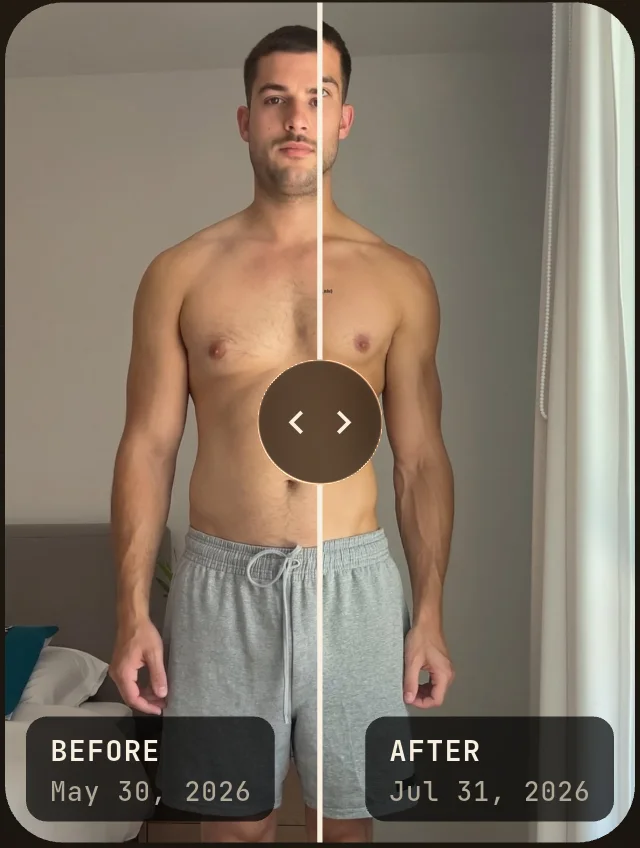
Weight loss before and after in the same frame
Type your weight or waist in with each photo and SameShot charts the number next to the photos, so a flat stretch on the scale sits beside photos that still change. The app never estimates a number from a photo, and every figure in the chart is one you typed.
- If the photos and the scale disagree, read how to photograph body recomposition.
- To take the after photo from the exact spot of the before, use a before and after photo app.
- Got a before and an after already? The before and after maker puts them side by side in your browser.
- For a whole folder of photos, make a progress photo time lapse from the photos you already took.
Common weight loss photo mistakes
- Pulling the stomach in for one photo and letting it go in the next.
- Comparing this week with last week. Compare with a month ago, or with the first photo.
- Judging progress from a photo taken after a big meal or a salty day.
Weight loss progress photo questions
How often should I take weight loss progress photos?
Every one or two weeks, on the same day, in the same clothes, first thing in the morning. Daily photos mostly capture water and food, which can swing your outline more than a week of fat loss does.
How do I take a progress photo for weight loss?
Prop the phone at chest height, stand on a floor mark in fitted clothes, and take a front, a side and a back photo in window light. Next time, line each one up with the faint previous photo before you shoot, or let auto capture fire when you match.
Why has the scale stalled when my photos have changed?
Weight and shape are different measurements. Losing fat while holding or gaining muscle can leave the number flat for weeks while your shape keeps changing, and a set of photos from the same spot is a cheap way to see it.
Does SameShot estimate body fat from my photos?
No. SameShot does not read your body: there is no body fat estimate, physique rating or muscle score. Any number in the app is one you typed in yourself, such as your weight or your waist.
Other things people track with SameShot
Get SameShot on Google Play
Start a project today. The first photo you take becomes the ghost that the second one lines up against.

SameShot: Progress Photo Cam
By Appynox, on Google Play

Free with ads; a single Premium payment removes them. Needs Android 8.0 or newer.