
How to take a photo a day for a year and actually finish
Settle the setup before photo one and keep it all year: a lamp you can use in any season, a fixed distance from phone to face, and the video's shape (square or 9:16). After a missed day, carry on the next morning; a gap costs one frame. A year of daily photos is 365 frames, about 30 seconds of video at 12 frames per second.
What a year of daily photos turns into
Do the sums before the first photo, because they settle questions most people leave until the end. A year of daily photos is 365 frames. How long the finished video runs depends on one setting: how many of those frames play each second.
| Frames per second | 365 frames play for | Each day is on screen for |
|---|---|---|
| 6 | about 61 seconds | a sixth of a second |
| 12 | about 30 seconds | a twelfth of a second |
| 24 | about 15 seconds | a twenty-fourth of a second |
| 30 | about 12 seconds | a thirtieth of a second |
The best-known project of this kind plays slowly. Noah Kalina began taking a photo of himself every day on 10 January 2000, and his video Everyday shows the photos “six per second”, according to his Wikipedia biography. At that pace a single year fills about a minute.
A weekly gym project is the opposite case: 52 frames a year, which at 12 frames per second is over in about four seconds. A daily selfie has seven times as many frames, so it can play faster and still last long enough to watch, or you can trim it to the stretch where the most changed. The post on how many photos a time lapse needs covers the short end of that scale, and the time lapse calculator works out any count and rate.
Leave the frame rate open until the end, and pick tools that let you set it. Google Photos can turn selected photos into an animation, which its help page calls “a quick-moving GIF”, and the same page says “You can’t speed up or slow down your animation.” If your photos end up spread across apps, the free progress photo time lapse maker on this site turns a set of photos into a video in your browser, and the selfie time lapse guide walks through the editing route.
Why year-long projects drop off in the first month
The drop-off comes early. Norcross and Vangarelli followed 200 people through their New Year’s resolutions: one week in, 77% were still keeping them; after one month, 55%; after six months, 40%. The figures are summarized in a 2020 PLOS ONE paper on resolutions. A photo a day is a resolution like any other, so plan for the first four weeks as the hard part.
Decide now what a missed day means. It means one missing frame. At 12 frames per second that is a twelfth of a second of video, and a whole missed week is about half a second, which is hard to spot in a year of faces. Restarting from day one after a gap throws away every photo you already have, so carry on the next morning and let the gap stay in the record.
Start on a day that feels like a beginning. Dai, Milkman and Riis found that Google searches for “diet”, gym visits and commitments to pursue goals “all increase following temporal landmarks”, such as the start of a new week, month or year (The Fresh Start Effect, 2014). In their gym data, the start of a new week raised the chance of a visit by 33.4% and the start of a new year by 11.6%, so a Monday is a strong landmark in its own right. New Year’s Day 2027 falls on a Friday; if it slips past, Monday 4 January is the next one. 2027 is not a leap year, so a 1 January start finishes on 31 December with exactly 365 frames.
Pick a light you can repeat in July and December
Over a year the light in a room changes a lot, and in a daily video each change shows up as flicker on your skin and in the background.
A window is the usual trap. The sun sits higher in summer and lower in winter, so light through the same window arrives at a different angle and for a different number of hours each month, and a morning that is bright in June can be dark in December at many latitudes.
The fix is a lamp you control. Use the same bulb in the same place, switch it on for every photo, and keep the ceiling light either always on or always off. Soft light suits a face, so aim the lamp at a pale wall or ceiling near the phone and let the bounce light you. A fixed light also gives the phone’s automatic exposure and white balance less to chase, which keeps your skin tone from shifting between frames.
If you want window light anyway, make it a choice: one window at one clock time, accepting that the year will show as a slow drift from bright to dim and back. That drift can look good, since it reads as the seasons passing; it just has to be decided on day one.
Hold the phone at the same distance every day
Distance changes the shape of a face as well as its size in the frame. Ward and colleagues modeled faces photographed at 12 inches, a typical selfie distance, and at 5 feet (JAMA Facial Plastic Surgery, 2018). At 12 inches the nose looked 30% larger in men and 29% larger in women than in an undistorted view, and at 5 feet, “a standard portrait distance”, the effect all but disappeared.
So a selfie taken at full arm’s length one day and with a bent elbow the next makes your face swell and shrink in the video. Software that lines photos up after the shot can scale a closer photo down until the face is the same size, but it cannot undo the perspective: the nose stays larger relative to the width of the face, a limit covered in why software stabilization cannot fix misaligned progress photos.
Two habits hold the distance:
- Straighten your arm fully for every selfie, so the length of your arm sets the distance.
- Prop the phone on a shelf, set the self timer and stand back, which also brings you nearer the portrait distance where the distortion fades.
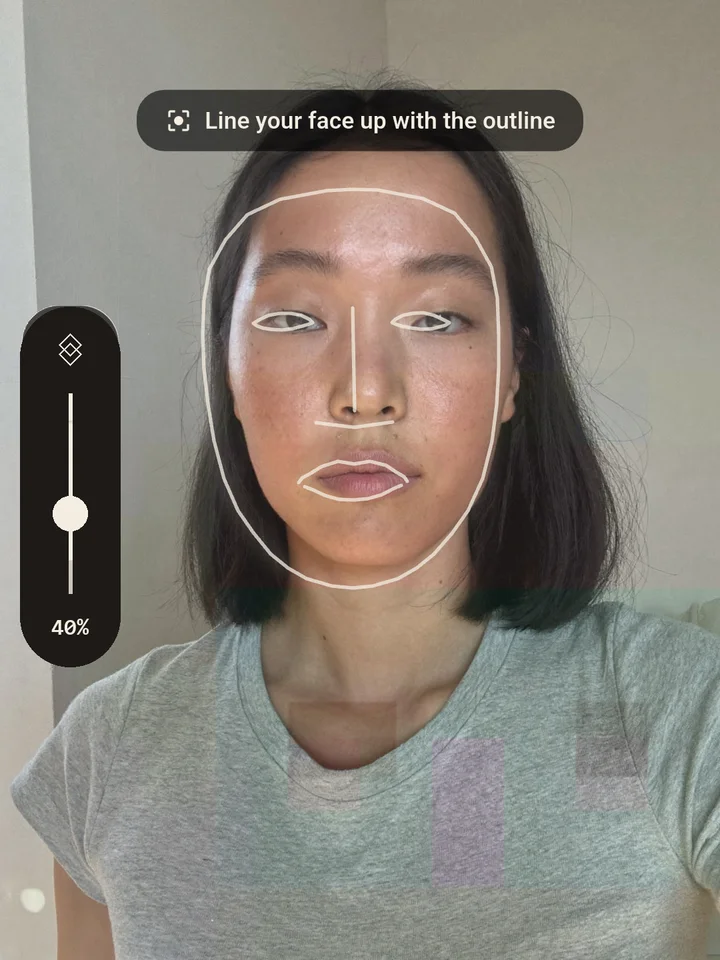
A ghost overlay makes the check visual. If your face fills more of the frame than yesterday’s faint outline does, you are closer than you were yesterday.
Face mode or a fixed spot
Two setups keep a year of selfies consistent, and they suit different lives.
A fixed spot means a wall, a lamp and a shelf for the phone that you use every day. It gives the cleanest video, because the background holds still, and it suits anyone who is home at the same hour most days. Travel is its weak point: a week away is a week of gaps or odd frames. The guide to daily photos in the same spot covers that setup.
Face mode follows your face, so a daily selfie lands in the same place in the kitchen, the car or a hotel room. In SameShot by Appynox, yesterday’s photo sits faint over the live camera (at 40% opacity to start, adjustable from 0 to 100%), and auto capture can fire the shutter once the frame lines up. Each photo is then lined up with the first one automatically after you take it. The background changes from day to day while the face holds its place, so the video reads as one face moving through many rooms. The daily selfie app page shows that setup, and this comparison of Android progress photo apps covers the alternatives.
You can mix the two: the home spot on most days and face mode when you travel.
Pick the shape on day one as well. A project keeps the aspect ratio it starts with, so choose 9:16 at the first photo if the year will end up on Reels, Shorts or TikTok. That choice is free in SameShot, while reframing a finished project to another shape is part of Premium.
What to export along the way
Check the project at three points, so a problem with the setup turns up while it is still cheap to fix.
- Day 30. Thirty frames play for 2.5 seconds at 12 per second, or 5 seconds at 6. Treat it as a test: look for flicker from the light, a face that swells and shrinks, and a background that jumps. All three can still be fixed after a month.
- Day 100. A hundred frames make about 8 seconds at 12 per second, long enough for a Reel or a Short and the first version worth sharing. A 1 January start reaches day 100 on 10 April.
- Day 365. Render the full year at two or three frame rates before you settle. Six per second gives a minute you can study, 24 gives 15 seconds for a short video, and 12 sits between them. A date or a day count in a corner helps viewers follow the year, and a before and after of day 1 against day 365 makes a good second post.
SameShot is free on Google Play for Android, and the iPhone version is in development. Its reminders run on the weekdays you choose, with milestone reminders at day 7, 30 and 100, and the streak count forgives one missed day. A project plays back in the app with a speed control, so the day 30 check needs no export, and date stamps can put the date, Day N or Week N in one of six positions. The free version shows ads, keeps one project and renders every photo into an HD video (up to 1280 px) with hard cuts; Premium, a one-time purchase, removes the ads and adds unlimited projects, App Lock and 1440 px video with smooth transitions. The version history lists when each of these arrived.
Sources
- Noah Kalina, Wikipedia.
- Oscarsson M, Carlbring P, Andersson G, Rozental A. A large-scale experiment on New Year’s resolutions: Approach-oriented goals are more successful than avoidance-oriented goals. PLOS ONE, 2020.
- Dai H, Milkman KL, Riis J. The Fresh Start Effect: Temporal Landmarks Motivate Aspirational Behavior. Management Science, 2014.
- Ward B, et al. Nasal Distortion in Short-Distance Photographs: The Selfie Effect. JAMA Facial Plastic Surgery, 2018.
- Google Photos Help. Make creations with Google Photos (Android phone and tablet).
Frequently asked questions
How long is a video of one photo a day for a year?
365 photos play for about 30 seconds at 12 frames per second, 15 seconds at 24 and about a minute at 6, the rate Noah Kalina's Everyday video uses. Choose the rate at the end, in a tool that lets you set it, and try two or three before you settle.
What happens if I miss a day?
You lose one frame, which is a twelfth of a second of video at 12 frames per second. Carry on the next day. Restarting from day one throws away every photo you already have, and a year with a few gaps plays almost exactly like a complete one.
What is the app where you take a picture every day?
Several Android apps are built for it. Some show your last photo faint over the camera so you can line up the next one, and others line up faces after you import them. SameShot by Appynox is a free Android app of the first kind, with a face mode for selfies, daily reminders and a time lapse export.
Can Google Photos make a time lapse from daily selfies?
It can make an animation from selected photos, which Google describes as a quick-moving GIF, and its help page says you can't speed up or slow down an animation. For a year of daily photos, use a video tool where you choose the frame rate.
When should I start a photo a day project?
On a day that feels like a beginning. Research on the fresh start effect found that gym visits and goal commitments rise after landmarks such as a new week, month or year. New Year's Day 2027 is a Friday, and Monday 4 January is the next landmark if you miss it.
Line up your next photo with SameShot
SameShot shows your last photo faint over the live camera, so each new one lands in the same place. It is free on Google Play for Android.

SameShot: Progress Photo Cam
By Appynox, on Google Play
