
A beard growth timeline from the first stubble to a full beard
Nobody sees their own beard fill in, because the mirror shows it every day from a slightly different angle. A daily photo from a locked frame is the record of the month you lived through, patchy spots and all, and SameShot holds yesterday's photo faint in the camera so today's lands on top of it.
For a longer guide to the angles, the light and how often to shoot, read how to track beard growth with progress photos.
SameShot is a free progress photo app for Android, made by Appynox. The iPhone version is in development.
How often to take beard progress photos
Every day, or every other day. A beard changes very little in a day and a lot in a week, so weekly photos make the video jump from one length to the next. Daily photos give a video that flows, and every other day still works if daily feels like too much.
Every subject has its own pace; the article on how often to take progress photos compares them side by side.
Beard photo setup: when to shoot, which angles and what light
-
Shoot before you touch it
Take the photo at the same point in your routine each day, before you wash or brush the beard. A brushed beard sits differently from a slept-on one, and that difference is bigger than a day of growth.
-
A front project and a profile project
The front shows density and the patchy areas filling in; the profile shows length, which hardly shows from the front for a long time. Free keeps one project, so start with the front. Premium has no limit.
-
Soft light from in front
Side light rakes across a beard and makes it look thicker than it is. Soft window light from in front of you is less flattering and much easier to compare from one day to the next.
-
Keep the trim days in the project
Keep the photo from the day you tidied the neckline. The step in the timeline is information, and a video with a visible trim is easier to believe than one without.
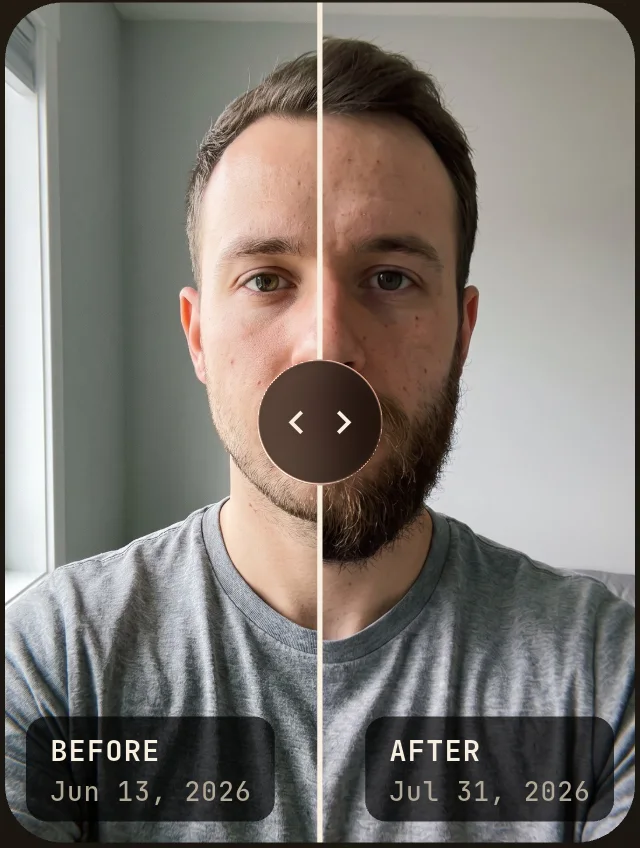
Beard before and after in the same frame
With both photos taken from the same distance, the slider shows the beard filling in while the eyes, the ears and the collar stay where they were. SameShot also lines each new photo up with the first one after you take it, and the date chips on the slider show how long the growth took.
- A beard project runs on face mode, the same as SameShot as a daily selfie app.
- Already have beard photos from before you started? Turn them into a time lapse in your browser.
- To compare two beard photos you already have, try the photo alignment checker.
Common beard photo mistakes
- Starting the project two weeks in, once there is something to show. The bare start is what makes the end look like a beard.
- Comparing a combed beard with an uncombed one and reading the difference as growth.
- Changing the distance to the camera as the beard gets bigger.
Beard progress photo questions
How do I track beard growth with photos?
Take one photo a day from the same distance and angle, in the same light, before you brush or wash the beard. Line each new photo up with the faint previous one so the frame never drifts, then export the set as a time lapse when you want to see it move.
How long does a beard take to fill in?
It varies a lot between people, and patchy areas often fill in later than the rest. A daily photo set is the most reliable way to tell, because the change from one day to the next is smaller than your memory of yesterday.
Should I take beard photos before or after trimming?
Before, and keep shooting on trim days too. A consistent moment in your routine matters more than the beard looking its best, and the visible step where you tidied it makes the rest of the timeline easier to trust.
Can I put the day number on a beard time lapse?
Yes. Date stamps put the date, Day 12 or Week 6 on the video or on a before and after image, in one of six positions.
Other things people track with SameShot
Get SameShot on Google Play
Start a project today. The first photo you take becomes the ghost that the second one lines up against.

SameShot: Progress Photo Cam
By Appynox, on Google Play

Free with ads; a single Premium payment removes them. Needs Android 8.0 or newer.