
Skin progress photos taken in the same light every time
A treatment can look like it is working on Tuesday and failing on Thursday purely because the light came from a different side. With skin, the light changes the photo more than a week of progress does, so the frame and the light have to stay fixed while the routine does its work.
For a longer guide to light and angles, read how to take skincare and acne progress photos in consistent light.
SameShot is a free progress photo app for Android, made by Appynox. The iPhone version is in development.
How often to take skin progress photos
Every day, or every third day. Skin renews over several weeks, and many treatments look worse before they look better. Frequent photos show the shape of the whole stretch, so a bad week reads as part of a curve and you can see where it turns.
Every subject has its own pace; the article on how often to take progress photos compares them side by side.
Skin photo setup: one light, a bare face and three angles
-
A window in front, ceiling light off
Stand facing a window with the overhead light switched off. Light from above throws shadow into every bit of texture and makes normal skin look worse than it is.
-
Bare face at the same hour
Before any product, after washing, at the same time of day. Morning skin and evening skin look different, so pick one and stay with it.
-
Front and both cheeks
Three projects, because most treatments work unevenly across the face and a front photo alone hides it. Free keeps one project; Premium has no limit.
-
Leave the photos unedited
Skip every filter and exposure fix, including the beauty mode some phone cameras turn on by themselves. The set is useful only when each photo is as plain as the first.
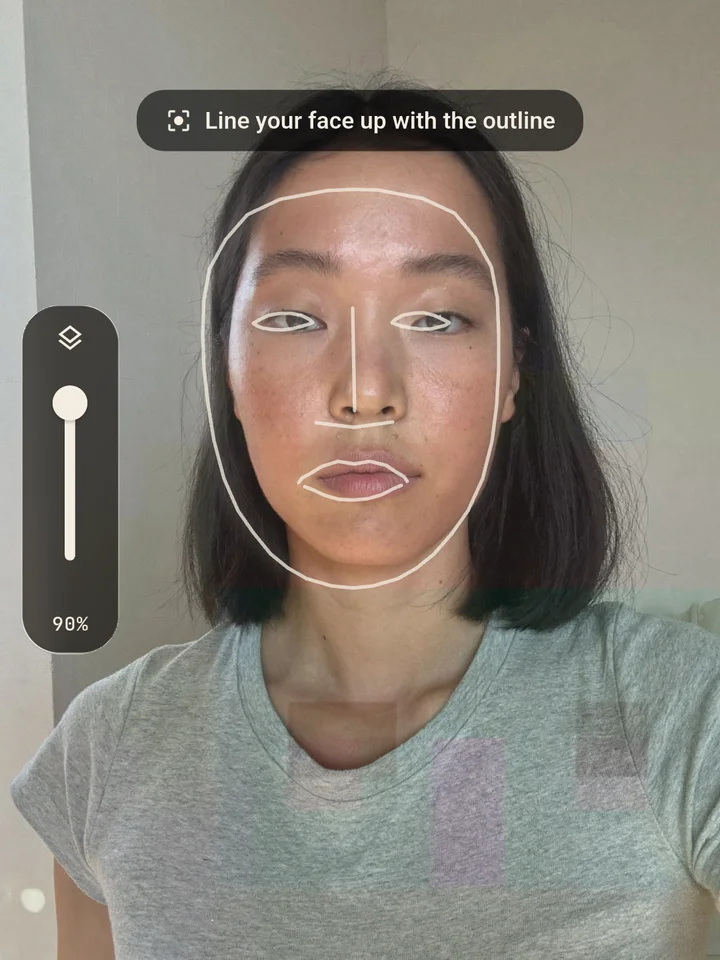
What the camera shows while you line up a skin photo
Drag the slider up to 90% and last week's photo almost covers the live view, which makes it easy to put your cheek and jaw back where they were. Drop it to around 40% to see both, then shoot or let auto capture fire. Photos are saved as you took them, with no smoothing or retouching, so the set shows your skin as it was on each day.
- A skin project uses the same face mode as the SameShot daily selfie app.
- Two old photos that look different for no clear reason? Check how well they line up with the free alignment checker.
Common skin photo mistakes
- Photographing after a hot shower, when the skin is flushed.
- Judging a treatment after three days, when the change you are waiting for takes weeks.
- Changing the distance to the camera, which changes how large pores and spots look.
Skin progress photo questions
How do I take good skin progress photos?
Bare face, freshly washed, facing a window with the ceiling light off, at the same hour, from the same distance and angle, with no filter. Line each new photo up with the previous one so the light and framing stay fixed and only the skin changes.
How long before skincare progress shows in photos?
Most routines need several weeks, and many treatments look worse before they look better. A regular photo set shows the shape of the curve, so one bad week does not decide whether the routine is working.
Can I keep skin photos private on a shared phone?
Yes, with App Lock, which is part of Premium: the app asks for your fingerprint, face or PIN before it opens. SameShot has no photo server, so the photos stay on your phone. The app does use the network for usage statistics, ads in the free version and an optional sign-in, and none of those carries a photo.
Other things people track with SameShot
Get SameShot on Google Play
Start a project today. The first photo you take becomes the ghost that the second one lines up against.

SameShot: Progress Photo Cam
By Appynox, on Google Play

Free with ads; a single Premium payment removes them. Needs Android 8.0 or newer.