
Why your before and after photos do not match
Four things break a before and after: camera distance, camera height, the angle of the body or the camera, and the direction of the light. Distance and angle change the apparent shape of the subject, height changes proportions, and light changes how much definition shows. Software can line up small shifts and even out brightness afterwards. A different distance, height or angle has to be fixed before the shutter fires.
Two photos, twelve weeks apart, and the second one somehow looks worse. Or identical. Or so different that it feels like cheating.
Almost always the body did what it did and the photograph moved. Four things are involved, they are not equally important, and only small differences in them can be repaired after the fact.
Camera distance, the one nobody notices
This is the biggest offender and the hardest to spot, because a photo taken from one metre away and a photo taken from two metres away both look like ordinary photos. Nothing in either one says the distance changed.
What changes is apparent proportion. A lens close to a subject enlarges whatever is nearest to it and shrinks everything behind. A 2018 study of selfies found that at 12 inches (about 30 cm) a nose looks about 30% larger than in an undistorted view, and that at 5 feet (about 1.5 m) the effect essentially disappears. Move a phone in by half a metre and the part of you closest to it, usually the torso or the nose, grows next to everything else. Move it back and the same body looks narrower and more evenly proportioned.
So a progress photo taken slightly closer than the first one can hide twelve weeks of work, and one taken slightly further back can show progress that never happened. Over a long project it is easy to drift a little closer without noticing, and that works against the very change you are recording.
The fix is a floor mark. A strip of tape where your heels go and a fixed place for the phone. A mark on the floor beats “about two metres” every time, and it is a decision you make once.
Camera height, which rearranges your proportions
Height does something different from distance: it changes which parts of you are nearest the lens.
A phone low down sits nearer your legs than your head, so the legs look longer and the torso shorter. A phone at eye height does the reverse. Neither is wrong, but the two do not compare, and a phone propped on whatever was free that week moves between them.
For a full body photo, a level phone at about navel height keeps your head and your feet at similar distances from the lens. For a head and torso photo, use chest height; for a face, eye level. For a room, keep the phone level without tilting it, because tilting turns straight walls into converging ones, and the amount changes with every degree.
The fix is a fixed surface. A shelf, a windowsill, a chest of drawers or a stack of books that lives in that spot. The exact height matters far less than it being the same every time.
Angle, the one that adds up over weeks
Rotation is the sneakiest of the four, because it builds up.
A body turned five degrees from the last photo is hard to see on its own. Five degrees a session, always the same way, is fifty degrees by photo ten, and you are comparing a front view with a three quarter view without ever having decided to. The same thing happens to a phone resting against a wall that gets nudged a little every week.
Angle drift is what makes the middle of a photo set unusable. It rarely breaks a set suddenly; it wears it down.
The fix is a reference in the frame. Something rigid that does not move: a door frame, a light switch, a picture rail, a window edge. A ghost overlay does this for you by showing the whole last photo, background included, over the live camera, and a light switch plus some attention does the same job by hand.
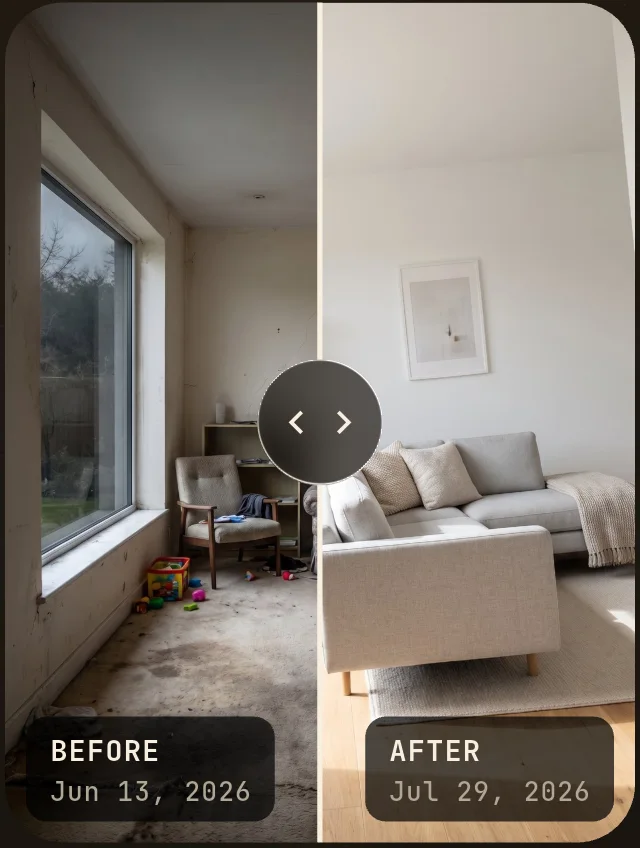
Light, the one you can partly fix later
Light leaves your shape alone and changes how much of it shows.
Overhead light, the kind in most bathrooms, throws shadow into every dip and texture. On a body that reads as muscle definition, on skin as texture and pores, on a hairline as thinning. Light from a window in front of you removes most of it.
The two are so different that the same person photographed under both, minutes apart, can look like two stages of a transformation. That is how many misleading before and after photos come about, often by accident.
Light can also be partly repaired afterwards. Exposure and contrast can be nudged towards matching, at least enough to compare. You cannot undo the direction the light came from, but you can stop one photo being twice as bright as the other.
The fix is one window and one hour. Face a window with the ceiling light off, at roughly the same time each session. Overcast days give the most repeatable light there is.
How much each one matters
| Variable | What it changes | Fixable afterwards? | Fix at capture |
|---|---|---|---|
| Distance | Apparent proportions | The size can be matched, the perspective cannot | Floor mark, fixed phone spot |
| Height | Which parts look longer | No | One fixed surface |
| Angle | Which view you are comparing | Small turns only | A rigid reference in the frame, or a ghost overlay |
| Light | Visible definition and texture | Partly, brightness and contrast | One window, ceiling light off, same hour |
Distance, height and angle are mostly decided before the photo exists, so that is where to fix them.
What software can and cannot do afterwards
Solving this in software is tempting: load both photos, shift, scale and rotate until they overlap, and export.
For small differences that works, and SameShot does it automatically. Since version 1.0.5, each photo is lined up with the project’s first photo after you take it, in the viewer, the before and after slider and the video. The method has two costs, and both grow with the size of the mismatch.
Cropping throws away information. Forcing two differently framed photos into one matching crop means cutting away the edges of both. On a full body shot that can mean losing the outline you were trying to compare.
Resampling reworks the pixels. Any rotation or scaling works out each new pixel from its neighbours. For a holiday photo that does not matter. For a record of a body, a wound, a treatment or a build, the bigger the correction, the more of the image has been reworked.
Neither recovers an angle you did not shoot from. A large mismatch fixed in software looks lined up while showing less of what was there. That is why the ghost gets the frame close first, and the automatic alignment only has small differences left to handle.
The shortest version
Mark the floor. Fix the phone’s spot and height. Put something rigid in the frame. Face a window with the ceiling light off. Shoot at the same time of day.
Then the main thing left in the photo that can change is the subject itself. For a setup that takes one evening, see how to take progress photos by yourself. If you want the camera to hold the before photo in front of you while you take the after, that is what a before and after photo app with a ghost overlay does.
Frequently asked questions
Why do I look bigger in some progress photos than others?
Usually camera distance. A phone held closer enlarges whatever is nearest to the lens, so a photo taken a step closer makes the torso or the face look wider when nothing has changed. A 2018 study found selfies taken 12 inches from the face make the nose look about 30% larger than an undistorted view. Fix the distance and most of the effect goes away.
Can I fix misaligned before and after photos afterwards?
Partly. Software can shift, scale and rotate a photo to line up small differences, cropping the edges as it goes, and SameShot does this automatically after each shot. No software can recover an angle you did not shoot from, so a large mismatch has to be fixed when you take the photo.
Does lighting change how a body looks in a photo?
Yes, more than most people expect. Overhead light casts shadow into every dip, which reads as definition, and light from a window in front of you fills those shadows in. Two photos of the same person under those two lights can look months apart.
What is the most important thing to keep the same?
Camera distance. It changes apparent proportions more than anything else you control, and nothing in the photo shows that it changed.
Line up your next photo with SameShot
SameShot shows your last photo faint over the live camera, so each new one lands in the same place. It is free on Google Play for Android.

SameShot: Progress Photo Cam
By Appynox, on Google Play
