
A gym progress photo app that lines up every weekly photo
Most gym progress photos that fail to show a change were taken from a slightly different spot. A step closer, a shoulder turned, the phone an inch lower, and twelve weeks of training reads as two unrelated photos. SameShot keeps last week's photo faint over the live camera, so each new workout progress photo starts from the spot you used the week before.
For the full method, with poses, distance and light for any subject, read how to take progress photos that compare.
SameShot is a free progress photo app for Android, made by Appynox. The iPhone version is in development.
How often to take gym progress photos
Once a week. Bodies change slowly, and a daily photo mostly records water, food and lighting. A weekly photo on the same day is frequent enough to show the trend and far enough apart that each one shows something new.
Every subject has its own pace; the article on how often to take progress photos compares them side by side.
Gym photo setup: floor mark, phone height and light
-
Mark the floor and the shelf once
Put a strip of tape where your heels go and use the same shelf or ledge for the phone, at about chest height with the camera level. Stand back far enough that your whole body fits and the lens does not stretch you, and keep that distance for the whole block.
-
One project each for front, side and back
Each angle gets its own project, so each has its own ghost; a side photo lined up against a front ghost helps nobody. Free keeps one project, so start with the front. Premium has no limit.
-
Same time of day and the same light
Shoot in the morning, before food and training, by the same window or under the same lamp. A pumped photo late in the block next to a cold one from the start exaggerates the change, and a salty dinner the night before hides it.
-
Relaxed for the main project
Shoot the relaxed pose as the main project. A flexed photo changes with effort and mood from week to week, so it drifts more than your physique does; keep flexed photos as a second project if you want both.
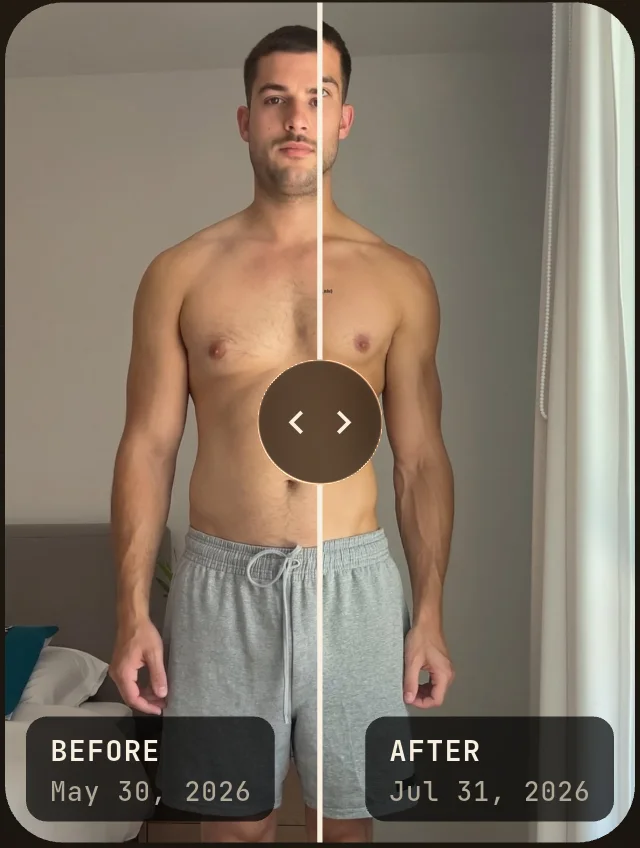
Gym before and after in the same frame
Drag across two photos taken from the same spot and the only thing that moves is you, while the wall, the window and the floor line stay put. After every shot SameShot also lines the new photo up with your first one, and a thin red, amber or green line on the photo shows how closely it matched, so a badly framed week is easy to spot.
- Shooting alone with no tripod? See how to take progress pics by yourself with a shelf and a self timer.
- On a recomp, where the scale barely moves, read how to photograph body recomposition.
- Already have a folder of gym photos? Turn your progress photos into a time lapse in your browser.
- Choosing between apps? Read the best progress photo apps for Android, compared.
- GainFrame is on iPhone only; if you are looking for something similar on Android, see SameShot as a GainFrame alternative.
- Plenty of gym photos are taken in a bathroom mirror. Read why SameShot has no photo server.
Common gym photo mistakes
- Shooting flexed in one photo and relaxed in the next.
- Standing closer as you get leaner, so the frame zooms in a little more each week.
- Bathroom ceiling light in one photo and window light in the next. Overhead light carves shadows that read as definition.
- Deleting the early photos because you did not like them. They are the ones that give every later photo something to be compared with.
Gym progress photo questions
How often should I take gym progress photos?
Once a week, on the same day, in the same light and the same state. Bodies change over weeks, so a daily photo mostly records water weight and lighting; a twelve week block gives you twelve photos that each show a step.
How do I take gym progress pictures by myself?
Prop the phone on a shelf at chest height, mark where your heels go, and use the self timer or auto capture so nobody has to hold it. Auto capture fires the shutter once you line up with the faint ghost of last week's photo, so you can stand back and wait.
Should progress photos be flexed or relaxed?
Relaxed, for the main set. A relaxed pose is far easier to repeat, so the comparison shows your physique changing and leaves the effort you put in on the day out of it. Keep flexed photos as a second project if you want them; Free keeps one project and Premium has no limit.
Why do my before and after photos look the same?
Usually the framing changed more than the body did. If the second photo was taken a step closer, at a slightly different angle or in different light, the change is buried under those differences. Lining the new photo up with the faint previous one before you shoot removes most of them.
Is there an app for gym progress pictures on Android?
Yes. SameShot is a free progress photo app for Android by Appynox. It shows last week's photo as a faint ghost over the live camera, plays the set back as a before and after slider or a time lapse video, and keeps the photos on your phone. The iPhone version is in development.
Other things people track with SameShot
Get SameShot on Google Play
Start a project today. The first photo you take becomes the ghost that the second one lines up against.

SameShot: Progress Photo Cam
By Appynox, on Google Play

Free with ads; a single Premium payment removes them. Needs Android 8.0 or newer.